On this page
“Connect an app” sounds like a single operation. In practice, it covers several different things: asking a provider for permission, storing credentials, retrieving records, organizing a local copy and, possibly, returning selected information to a separate AI assistant.
Each stage controls a different part of the data path. Google authorization, local synchronization and assistant disclosure are separate decisions.
This explanation concerns Zortex's Google integrations. Other providers have their own authorization models. The Google integrations page and application privacy policy describe the current Google behavior.
1. You authorize a particular account
The connection starts with a Google account and Google's consent screen. That screen describes the permissions the application requests. Users should inspect it rather than inferring access from a button labeled “Connect.”
For Gmail, Zortex can retrieve message metadata and bodies for synchronization and search. Its production declaration includes both read-only and full Gmail access. The full permission is broader than the example mail operations listed in the policy. Supported actions can involve drafts, sending, labels and moving messages to Trash.
For Drive, Zortex can retrieve metadata and supported file content, and supported actions can create or update files and metadata. The declared Drive permissions include read-only and full access. Drive Activity is read-only. Docs and Sheets support user-requested document changes or range-based spreadsheet reading and updates. The declared Calendar permission is read-only: it does not authorize Zortex to create, edit or delete calendar events.
Those differences are consequential. A connected account does not mean all services share the same rights. Equally, granting a broad Google scope does not mean that every operation it permits is implemented as a dedicated Zortex feature.
2. Credentials take a separate route
A Google login involves communicating with Google and, for Zortex's shared Google OAuth client, a Cloudflare-hosted token broker. The broker processes authorization codes and PKCE information or refresh credentials, forwards the necessary request to Google's token endpoint, then returns a token response to the desktop application.
The broker handler reviewed for the application policy does not process Gmail message bodies, Drive documents or calendar event content as part of this exchange. It contains no explicit application-level persistence of token bodies and instructs clients not to cache the response. That is not proof that infrastructure produces no security or operational logs.
Local synchronization describes where the source records are stored. Google authorization credentials take a separate route through the broker.
3. Authorized records enter local storage
After authorization, the application can synchronize connected records into a vault on the device and maintain an index for retrieval. It can use metadata to support search and links back to original sources.
Google consent --> OAuth token exchange --> Local credentials
       |                                         |
       v                                         v
Authorized Google APIs --> Sync --> Local records + search index
                                            |
                                            v
                                    Retrieval on request
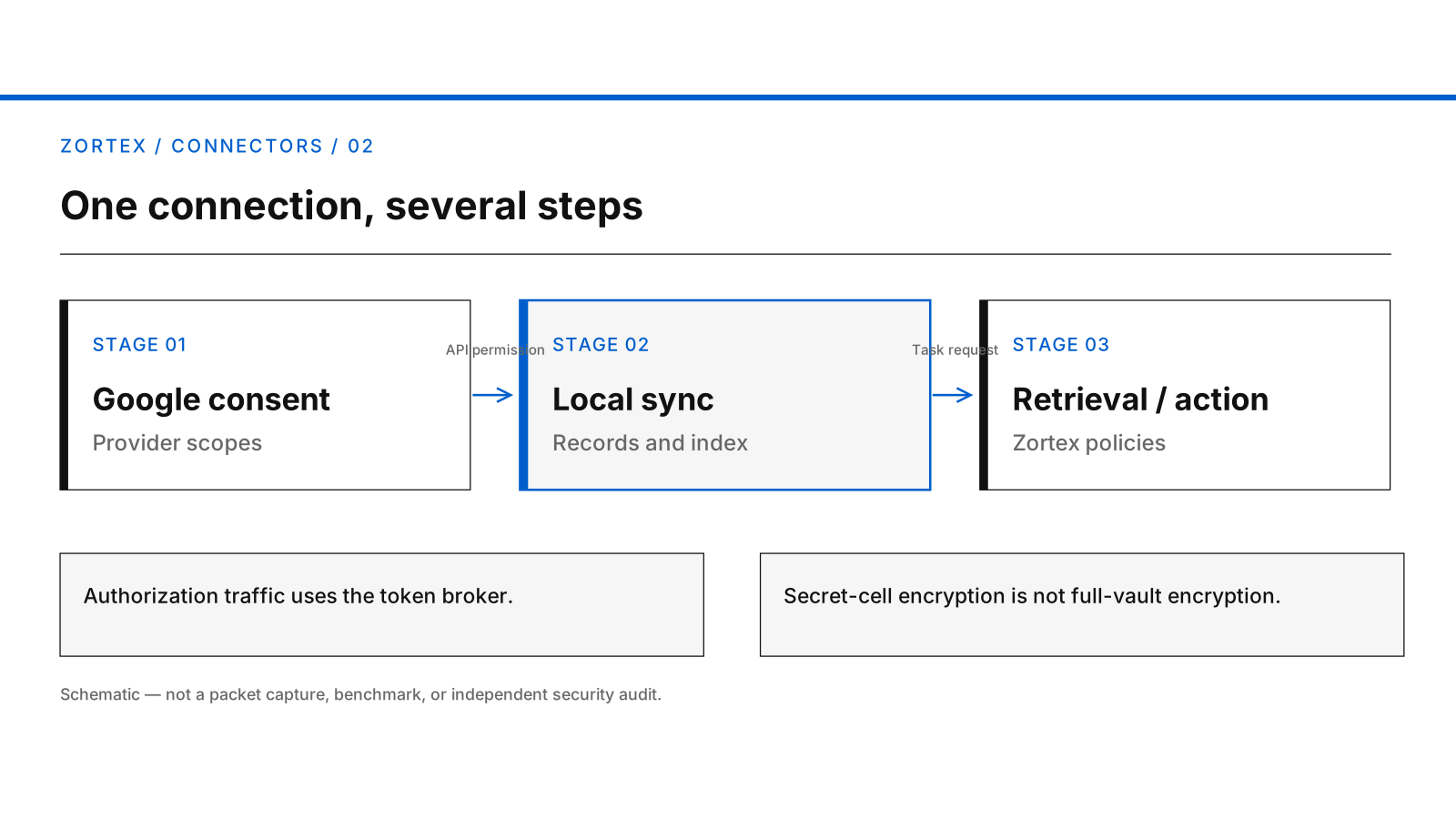
Google authorization and local source retrieval precede any separately permitted assistant handoff.
The generated geometric cover is available as a vector illustration.
An important storage detail: Zortex encrypts OAuth secret cells using AES-256-GCM. This is not the same as application-level encryption of every synchronized record and index field. macOS has a supported encrypted-vault container path; device and operating-system configuration still matter, and the same full-vault claim is not made for every Windows installation.
4. Searching is not the same as sharing
A local search can identify records without publishing a copy of the entire vault. Connecting a separate assistant through MCP changes the data path: Zortex can return permitted search results, metadata and selected content to the assistant host.
If that assistant uses a cloud model, the provider may process the results on its servers. What leaves depends on the request and the applicable Zortex grant and policy. Users should inspect the assistant's own retention and model-use terms before sending sensitive material. Local storage does not override those terms once the selected material has been delivered.
There is also a distinction between search and action. Reading a calendar event and sending an email are not the same class of operation. A requested action must be within the underlying provider authorization and Zortex's own applicable controls; authorization by Google alone does not imply approval of any action from every AI.
5. Disconnecting stops access and preserves local history
The product's disconnect operation disables the source's applicable grant and stops use through that grant. It preserves previously synchronized records. Removing Zortex from Google Account third-party connections prevents future access through that authorization. Neither operation necessarily erases information already stored on the device.
Local deletion is a further step and may involve configured event and index directories, backups, exports or uninstall archives. Removing content held by another AI provider is a separate process again.
That separation is intentional. It enables a user to stop a connection without immediately destroying their local work history, but it also means disconnect is not an erasure button.
For current permission details and deletion instructions, use the application privacy policy. For questions about a particular installation, contact support@zortex.me before removing files.
Sources: product implementation and the application privacy policy, reviewed October 9, 2026.