On this page
Ask Muse to find a supplier's revised quote, move a meeting and draft a reply. The immediate result may be an updated event and one email. The work behind it is less temporary: the agent has read correspondence, identified people, visited websites and learned something about an ongoing project. Those activities leave information in different places.
Meta's Muse is a personal agent; Muse Spark is its model family. A model generates responses. Muse is the larger service that holds memory, connects accounts and carries out work. Its privacy rules concern that service, not only the text sent to a model.
This analysis reviews Meta's disclosures as of October 9, 2026. The governing documents are the Muse Privacy Policy, effective September 17, 2026, and Muse Supplemental Terms of Service, updated September 8, 2026, alongside Meta's privacy guidance, data controls and engineering disclosure.
One source boundary needs stating: the live privacy and terms pages required login when checked for this article. Their dates were corroborated against a published policy comparison. The short terms quotations below were checked against reproduced clauses, rather than retrievable original legal text. Other quotations are from accessible Meta publications. The linked legal pages remain authoritative for decisions made under their terms.
What an interaction contains
An interaction may contain instructions, the agent's answers, voice, photographs, uploaded documents and the material it creates. It may also contain information retrieved from connected services to complete a task. Meta's data-controls description explicitly includes information about other people. Reading a calendar event may reveal attendees. Summarizing an invoice may expose a customer's address.
Meta addresses this separately in guidance for people who do not use Muse. Their information may arrive through someone else's connected accounts, messages or public web results. Meta describes limits on linking this material back to a nonuser and provides routes for privacy-rights requests. Those safeguards do not mean the information never enters Muse.
Muse also remembers conclusions. Its memory documentation says it may retain:
“Preferences and patterns it observes from your interactions.”
A temporary scheduling choice can become an inferred preference. Meta allows users to inspect and edit persistent files, including MEMORY.md. Other stored items include chat history, system files, artifacts, goals, identity information and scheduled tasks. There is both a source record and a working interpretation of it.
Meta says connecting email does not automatically download an entire inbox unless the user asks. Connectors search for task-relevant information; some can supply updates proactively, such as changes to calendar events. On macOS, Muse can be given Full Disk Access or Automation permissions, allowing it to read files and certain local apps. Meta says those interactions may include screenshots. Local access is another source of information, not evidence that Muse processes everything locally.
The VM and the paths beyond it
Meta describes a dedicated cloud virtual machine as the system of record for each user's Muse. Each VM is isolated from other users' VMs. The agent's runtime, durable database, credential storage and permission-checking systems occupy separate compartments. Passwords and OAuth tokens are stored outside the agent's normal runtime; the model does not receive raw passwords. A separate component named Sentinel governs network access and connector actions.
The same engineering disclosure states:
“Muse sends limited data out of the VM when necessary for inference and telemetry as described below.”
This matters because data held in an isolated cloud VM can still be processed elsewhere to answer questions or operate the service. Muse may also send information to a connected provider or the website on which it is acting. Meta says VM data is backed up continuously.
Your chats and files       Connected apps and Mac
          \                       /
           v                     v
           +---------------------+
           | Meta-hosted Muse VM |
           | Agent and browser   |
           | Chats / files       |
           | Memory / tasks      |
           |                     |
           | Credential store    |
           | Sentinel approvals  |
           +---------------------+
              |       |       |
              v       v       v
           Inference  VM    Connected services
           / telemetry backups and websites
              |
              v
           Training when enabled
           (on at first use)

  Meta says chats and VM data do not feed its ad systems.
  Visits to merchant sites may still influence advertising.
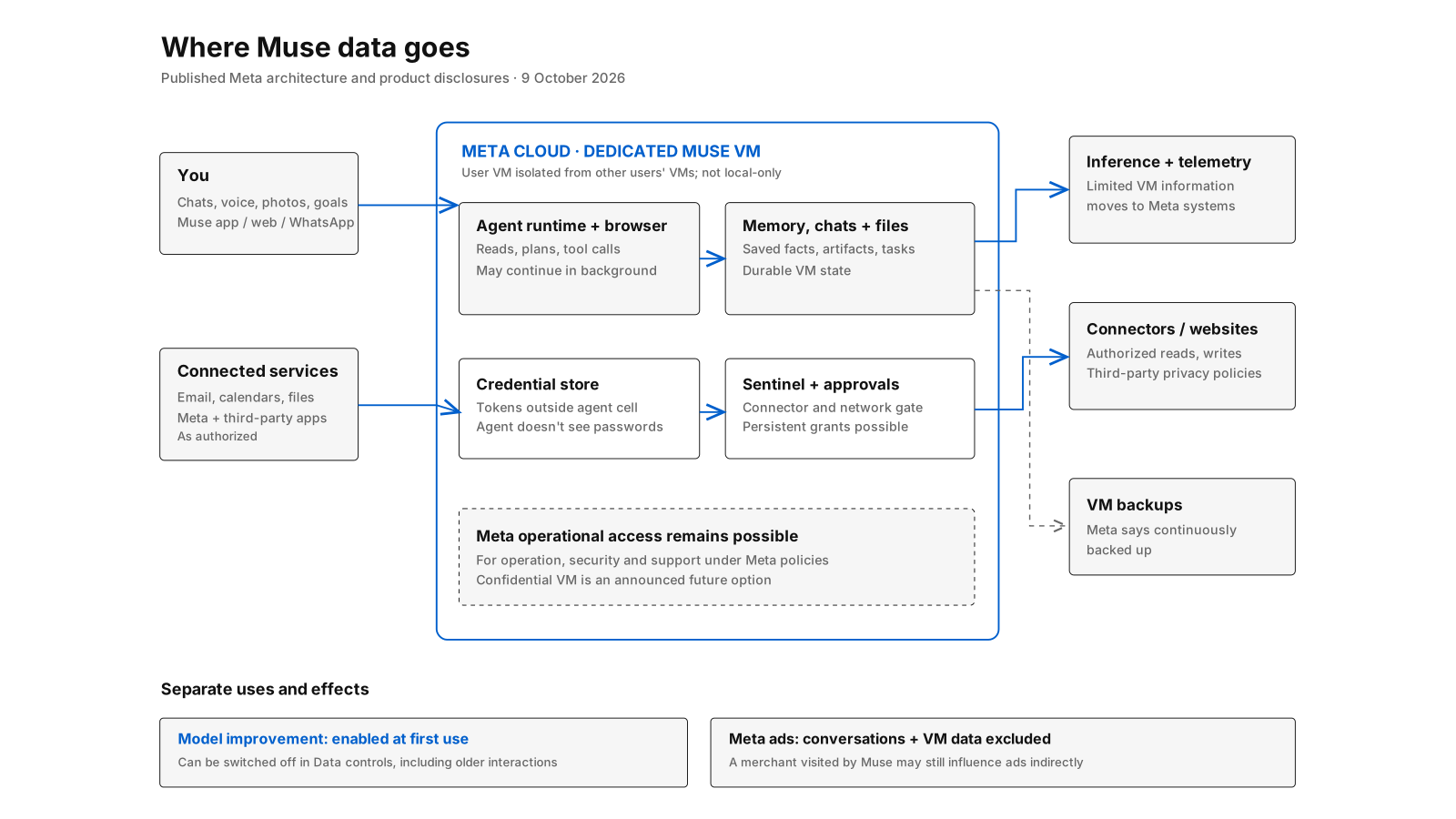
Diagram: Meta's published VM architecture, security services, stored context and external destinations.
Meta has announced a future Confidential VM intended to prevent even Meta from accessing the user's VM data. Its September engineering post describes a small testing group and broader release planned for later in 2026. The currently described VM provides isolation from other users, but Meta says operational policies govern personnel access and do not prevent the provider from accessing information when needed to support, secure or operate Muse. A cloud computer dedicated to one customer is still operated by another organization.
Advertising and third-party sharing
Meta's privacy and security help page says:
“Muse doesn’t share your conversations or the data in your virtual machine with Meta ad systems.”
Meta says the rule applies even when Accounts Center links other Meta products. This is a direct, meaningful exclusion. Its engineering post also explains that a visit to a merchant through Muse can be associated with the user's activity and affect advertising indirectly. Neither fact cancels the other: not handing chat contents to the ad system does not keep a retailer from recording a visit.
Connectors are separate data recipients, including Meta products and third-party services. They use information under their own terms and privacy policies. Meta's connector page says:
“Disconnecting stops Muse from exchanging data with the Connector.”
What Muse already received can remain in its memory and conversation history. What it previously sent to another service may remain under that service's rules. Disconnecting an account, deleting the copy inside Muse and requesting deletion from another provider are separate operations.
The same page notes that Facebook, Instagram and Threads may connect automatically when included in the same Accounts Center, and that Meta does not review how custom connectors use information. Those details matter when comparing a list of connected services with permissions the user remembers actively granting.
The model-training switch
There is a distinction between processing information for an assigned task and using interactions to improve models. Meta's data-controls instructions state:
“This setting is on when you first use Muse.”
The setting is called Help improve our AI models. To disable it, go to Settings → Data controls, turn it off and confirm. Meta says interactions are not used to develop and improve AI at Meta when the setting is off, and that changes also apply to earlier interactions.
That is broader than a forward-only opt-out. It does not establish that information already absorbed into a model's weights can be removed from an existing model; Meta makes no such technical claim on the help page. Training and operational retention are different issues.
Interactions can include connector data. A business asking Muse to reconcile invoices may therefore be using information about customers as task material. The relevant setting should be checked before authorizing that work. Meta says it removes certain identifiers, including names, email addresses, telephone numbers and Social Security numbers, from training material and disassociates interactions from accounts. It does not promise the removal of every identifying combination of facts. A unique job history or project may remain identifiable without a name.
Retention is not one number
Muse is designed to retain work across sessions. The documented stored information includes chats, persistent memory, files, reminders, goals and active tasks; Meta also reports continuous VM backups. The reviewed public pages do not provide a single fixed lifetime for the VM's data, backups, inference material and operational logs. A number of days would be more reassuring than an invented one.
The user-facing deletion controls are concrete. You can remove messages, side chats and artifacts, edit the memory file, cancel a scheduled task and delete files. Yet the data-controls page cautions that after deletion:
“Muse may still remember information it learned”
The source item and a fact inferred from it can survive independently. Meta's forget function searches memories and supporting files for a named subject and removes relevant information to the best of its ability. That is not the same as verifying erasure from every outside service or prior action.
For the broadest in-product removal, Meta says Settings → Data controls → Reset Muse deletes all Muse information, including chats, files and active tasks. Users can separately delete their Meta account or download chats, files and other agent information. A reset is not an undo function: it cannot retract an email already delivered or a record created through a connected provider. Meta does not publish a separate post-reset backup-expiry number in the documents reviewed here.
What the terms put on the user
The Muse Supplemental Terms deal with the consequences of delegated action. A reproduced clause says:
“You are also solely responsible for the actions Muse takes or directs”
The sentence concerns actions in furtherance of instructions, goals and guidance provided to the agent. Meta's directly accessible approval guidance also instructs users to correct mistakes, including those affecting third-party services or recipients.
The reproduced terms include a broad content licence that covers material from connected services and is limited in stated purpose to:
“solely to provide, maintain, secure and improve Muse”
The wider clause permits Meta to host, copy, modify and process content through a transferable, sublicensable, worldwide licence, subject to privacy and application settings. That is permission to handle material, not a transfer of copyright. The model-training toggle must still be read separately: a contractual licence to operate and improve a service does not tell the user whether a particular interaction is currently eligible for model training.
The supplemental terms also describe powers to suspend access and limit remedies, and assign financial risk associated with purchases to the user; these provisions are reproduced and discussed in the terms comparison. Their operation may depend on jurisdiction and the complete agreement. Given that the live terms required login during this review, anyone authorizing payments or publishing through Muse should inspect that document directly.
Muse does provide meaningful approval controls: a user can allow an action once, for a task, for a site or more persistently for a connector. Meta's guidance describes an activity log, revocation controls and separate enforcement outside the model. The existence of those checks does not imply a fresh confirmation is required before every action, or that a delivered message can always be reversed.
The data boundary in one comparison
| Question | Meta Muse's published position | Privacy-first design requirement |
|---|---|---|
| Where is context held? | Meta-hosted VM, isolated by user and backed up | Device storage by default; cloud sync separately chosen |
| What is collected? | Chats, media, learned memories, relevant connector data and authorized local information | Narrow access plus a record of material used and inferred |
| Who processes it? | Meta service infrastructure and authorized third-party destinations | Limited processors with clear onward-transfer boundaries |
| Model training? | Eligible interactions at first use; opt-out applies to earlier interactions | No personal-context training by default |
| After disconnection? | Future exchange stops; prior information can remain | Revoke access and separately manage cached, derived data |
| Deletion and retention? | Delete items, forget, reset; no universal backup-expiry period specified | Defined lifetimes for originals, memories and copies |
| Portability? | Export chats and files; import conversation history | Portable context, sources, corrections and permissions |
The right column defines the privacy-first design standard used in this comparison.
What a privacy-first product does differently
The first difference is who holds the durable record. A locally stored world model can be examined and corrected by its owner without making the AI provider the permanent custodian of every source. If cloud access is needed, it becomes a distinct decision about which information leaves the device. Merely using local storage does not solve privacy if a model is then given an unrestricted copy.
The second is the unit of permission. Instead of broad permanent access to an inbox or workspace, an assistant can receive selected context for a specific task, with the user able to see the source and withdraw the grant. Permissions must cover inferred summaries as well as files. An email summary can reveal the same person as the email.
The third is deletion that follows the information. Removing an original, removing a derived memory, cancelling future access and addressing a third party's copy are different actions. They should be visible as different actions, with retention bounds that can be checked.
Zortex describes a local-first desktop world model that can supply context to different AI tools under user control, with an optional cloud mode. That design direction faces the same questions as any other assistant. After a task is done and its window is closed, which copies, inferred memories, standing permissions and outside effects remain?