
On this page
A conversation with an AI can begin in seconds. Bringing it up to speed on a real project can take much longer.
The project exists across email threads, calendar events, working documents, decisions and the people who made them. None of those sources carries the full story alone. Switching to another assistant often means reconstructing that story one more time.
Zortex Version 2 brings those pieces together. It connects the apps where work happens, organises them into a private world model, and makes the relevant context available to the AI you choose.
The result is a different starting point for AI: less time establishing the backstory, more time working with it.
Explore the Version 2 launch experience for an interactive look at the system, its reference retrieval evaluation, and early access.
One world model for your work
Most apps hold records. Work is made of relationships.
A meeting belongs to a project. A document records an outcome. A message changes a decision. A colleague is responsible for the next step. The important information often lies in the connection between these things, not in any single message or file.
Zortex is built around this distinction. Its world model connects people, projects, documents, meetings and messages into a representation of how your work fits together.
That structure allows context to follow a question across app boundaries. If an assistant needs to understand who owns a project, the answer might be attached to a project record rather than the meeting or document that started the question. A connected model gives the system a path to that answer.
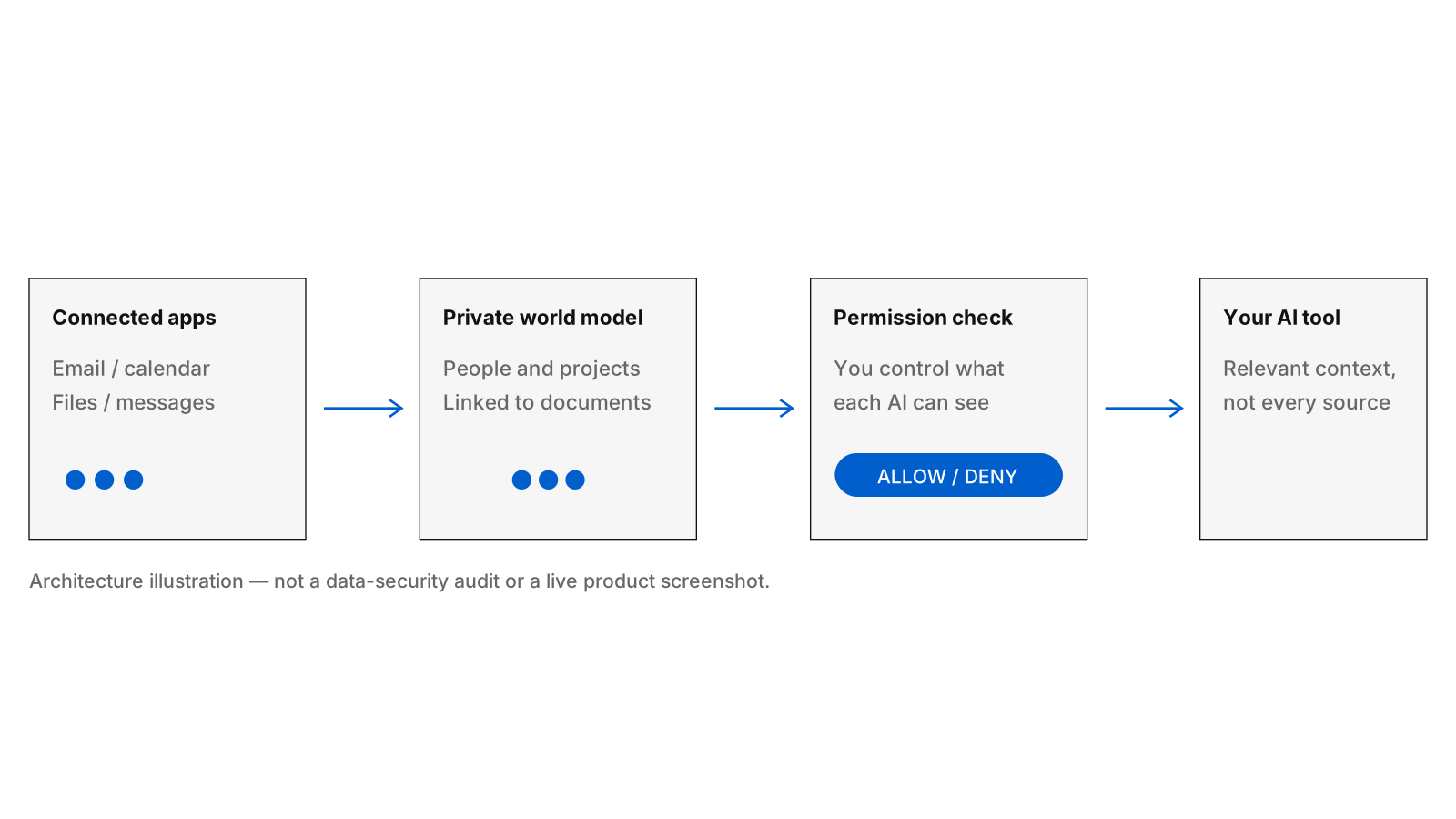
Zortex's context architecture: connected sources, a world model and an access decision before the AI handoff.
Your apps, working together
Email contains conversations and commitments. Calendar shows the flow of time and the people involved. Files carry details and outputs. Messages capture changes that may never reach a formal document.
Version 2 is designed to connect those sources into one working context without replacing the apps you already use.
The user experience follows three ideas.
Connect. Bring together the places your work lives. The important part is preserving where information came from as it enters the model.
Understand. Organise the connections between people, projects and records. The model becomes useful when it can identify what belongs together and follow those relationships.
Bring it with you. Supply relevant context to the assistant or coding tool you choose. Moving between AI interfaces should not mean losing the understanding built through earlier work.
This design also makes it possible to treat context as something you control independently from the AI product that consumes it. The AI interface may change; the working context remains attached to your work.
Measuring connected retrieval
Linked context has to be testable. We started with a specific question: when an owner is recorded on a project, can a lookup follow the right relationships from other records to return that owner?
Our published reference suite contains 48 projects and four types of lookup: a direct project request, a document relationship, a meeting relationship, and a message-thread relationship. The harness records every answer and every missing connection.
The direct task returned the expected owner in 48 of 48 cases. The document path resolved 42 of 48, the meeting path 40 of 48, and the thread path 36 of 48.
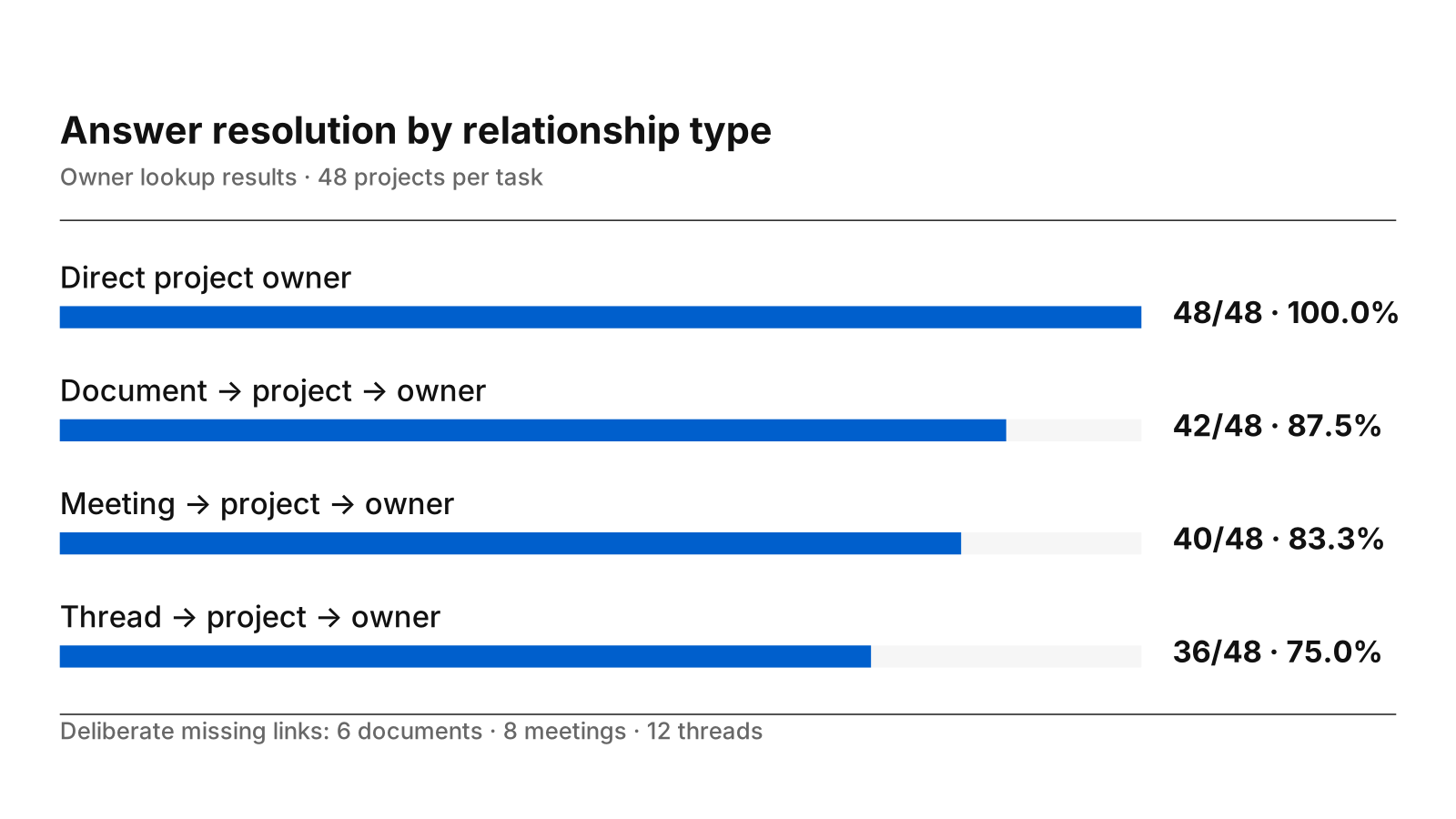
The cases deliberately include missing relationships. That makes it possible to inspect exactly which references resolve and what the lookup returns when a link is absent. The case-level results, source code and method are public.
Scope: these are measurements of the standalone graph-reference harness, not an end-to-end accuracy result for the desktop app. They establish a reproducible baseline for one retrieval behaviour. Product evaluations also need to cover real connector data, parsing, ranking and answer quality.
The broader lesson is simple: reliable context depends on reliable relationships. We are making those relationships explicit and measurable.
Your data, your decisions
The world model is personal. Ownership should not depend on which AI service happens to be most useful today.
Zortex is local first. You can keep the world model on your own computer. Optional Cloud access is a separate choice for connecting AI tools while your computer is off.
You also decide what each connected AI may see. A coding assistant might need project files and recent decisions. Another assistant might need a meeting's background. Neither should require the entire model by default.
Zortex does not use connected personal data to train AI models. The privacy policy describes the company's commitments. As with any AI workflow, the policies of tools you independently connect still matter when you choose to share information with them.
Privacy is not a separate screen to visit before doing the work. It belongs in the way context is selected and handed to each tool.
A desktop home for context
Version 2 is being prepared for Windows and macOS. Early access is the first way to experience it, and invited beta testers receive that access free.
The early-access form asks for an email address. A confirmation link makes sure the address belongs to you. After you confirm, Zortex can send an invitation and occasional product updates. You can request withdrawal or deletion at any time through the waitlist controls.
The idea behind Version 2 is enduring: your work has a history, relationships and decisions that should not disappear whenever you open a new AI.
Zortex is building the context layer that keeps those things together.