On this page
Deleting data should not require guessing what a button means. In a connected context system, though, at least four things can exist at once: the original information in an external account, a synchronized local copy, retained local archives or backups, and selected information already delivered to an AI host.
There is no single switch that controls every copy. This guide explains which operation affects which location, based on the current Zortex application privacy policy. It is especially relevant to Google connections. The steps may differ for other provider accounts and configurations.
Before deleting files: If you want to remove only one source while keeping your other Zortex context, do not use the full local-data removal procedure without guidance. The documented directory-level procedure is broad and can remove information from all connected sources.
Step 1: Stop further synchronization
If Zortex is still connected to a source, disconnect it first. Disconnecting disables the source's applicable grant and stops its use through that grant. This is useful when the immediate goal is to stop future retrieval or activity.
Disconnecting does not erase previously synchronized information. That is the point at which many privacy instructions become misleading: access control and data removal are different actions.
If you need to prevent future Google-authorized access at the provider itself, open your Google Account's third-party connections settings and remove Zortex's access. Google revocation prevents future authorized access through that grant. It does not reach into the computer and delete the local vault.
If you have connected more than one Google account, review the relevant account or accounts. Do not assume a revocation in one account covers another.
Step 2: Stop the application and background processes
Before deleting local Zortex data, stop the application and the associated background processes. The application privacy policy explicitly calls for this step. Removing files while a resident process is active can leave confusing partial state or allow components to write new files.
Data locations and background services depend on the installed version and configuration. To confirm the exact paths before deleting anything, contact support@zortex.me with the operating system and installation version.
Step 3: Identify every local location to remove
The documented deletion procedure requires removing the Zortex data directory and any separately configured event or index directories. It also requires dealing with retained uninstall archives, exports and backups that you want erased.
Disconnect + provider revoke ---> No new authorized access
               |
               v
Stop running processes ---> Remove local data / event / index locations
                                      |
                                      v
                            Review archives and backups

Separate branch: assistant provider copies --> provider's deletion controls
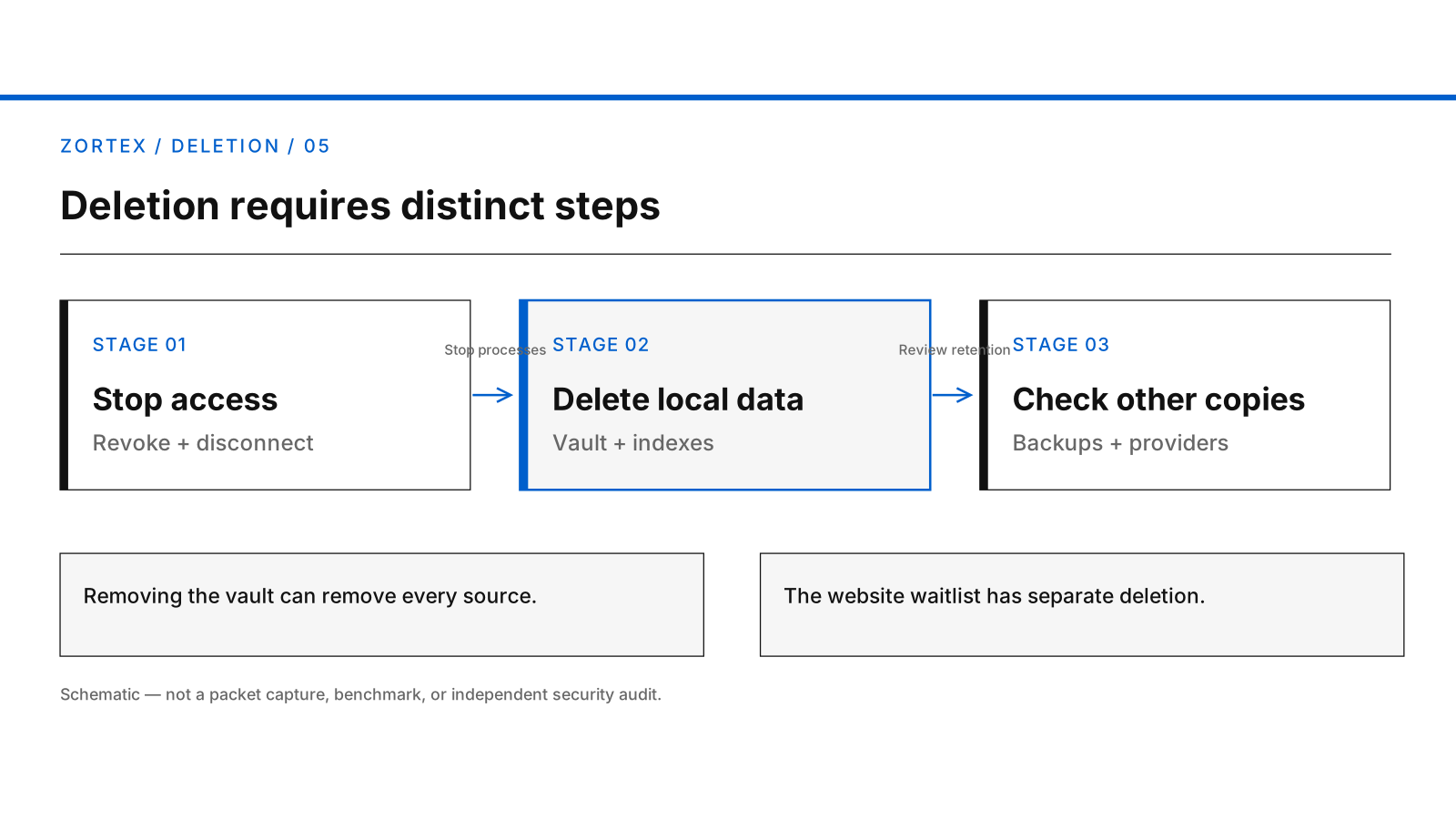
Disconnecting, erasing local copies and requesting removal from an external AI are separate steps.
The generated geometric cover is available as a vector illustration.
These storage locations are not necessarily one folder. The policy does not promise a universal automatic expiration period for synchronized records. Removing only a desktop shortcut or application binary is not sufficient evidence that stored data has gone.
Be explicit about the scope of a deletion. Removing the whole vault is not a Google-only deletion tool. It may erase locally retained records from every connected source. Take care not to destroy information you still need, especially where no independent copy or export has been verified.
Step 4: Check copies outside the current vault
Backups and exports are copies. If you have saved an archive elsewhere, deleted the current active data directory or uninstalled the app, those retained copies may still exist.
The application policy notes that uninstalling may preserve the event log or archive it. Consequently, uninstalling is not a deletion guarantee. Review the actual backup and archive locations on your installation rather than relying on an expected folder name.
Deleting a local copy also does not delete the original Gmail message or Drive file from Google. Removing original records, if desired, is a separate decision through Google's own product controls. Be especially careful with irreversible deletion at the source.
Step 5: Address information sent to a connected AI
Zortex may return permitted records, excerpts or metadata to an assistant through MCP. If that assistant uses a cloud model, the provider may have processed the returned information on its servers.
Deleting the local vault or revoking Google authorization cannot retroactively delete content received by the assistant provider. Use that provider's privacy, retention and deletion controls for any copy it keeps. The provider's terms, not Zortex's local deletion steps, determine what it can remove.
A narrow Zortex grant reduces future exposure but cannot recall an earlier disclosure.
Step 6: Handle website information separately
The desktop vault and the website's waitlist are separate systems. If you signed up for early access, the Leave the waitlist form lets you request removal or deletion of that entry. Those requests are handled manually; submission is not instant deletion. The website privacy policy explains that private backup copies rotate within 14 days after deletion and distinguishes leaving the list from erasing a signup.
Deleting the desktop vault does not automatically remove the waitlist email, and leaving the waitlist does not erase desktop records.
Verify each deletion boundary
The useful completion check is not “I pressed Disconnect.” It is whether further source access is revoked, the running processes have stopped, each configured local data location and retained copy has been addressed, and any independently held assistant or website information has been handled separately.
Check each local storage location and retained copy before marking deletion complete. For installation-specific help or Zortex privacy requests, use support@zortex.me.